Managing Students
This guide explains how to view and manage students associated with your partner account within the Partners Portal.
Accessing the Student List
- Navigate to the "Students" page. The link may be located in the main navigation menu.
- The page displays a list of students associated with your partner account.
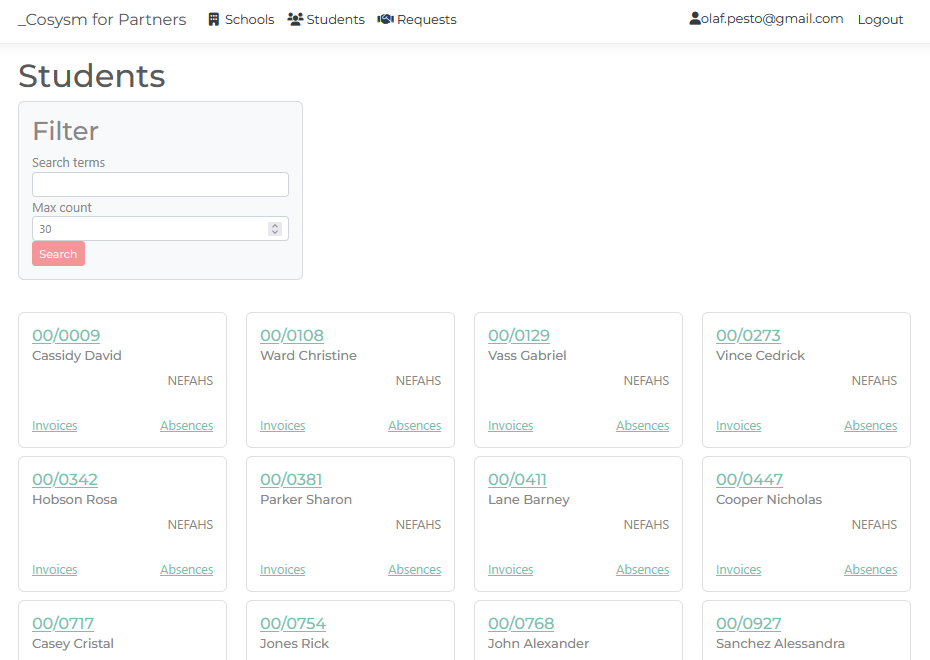 Figure 1: The Students page showing a list of all students
For each student, the following details are displayed:
- Picture: A profile picture of the student, if available.
- Student Code: A unique identifier for the student. Clicking the student code will take you to the student's details page.
- Name: The student's last name and first name.
- School: The short name of the school the student attends.
Student Actions
From the student list, you can perform the following actions:
- Clicking on the student code will navigate to the student's "Details" page, where you can view more comprehensive information.
- Links are provided to view invoices and absences associated with the student.
- You can view the student's current and past classes and access related reports.
×
![]()