Guardians Portal: Viewing Homework Assignments
This guide explains how to view upcoming and past homework assignments for your student(s) in the Guardians Portal.
Accessing Homework
- Log in to the Guardians Portal.
- Navigate to the "Homework" or "Assignments" section, typically found in the main menu or possibly linked from the student's profile or dashboard.

Viewing Assignments
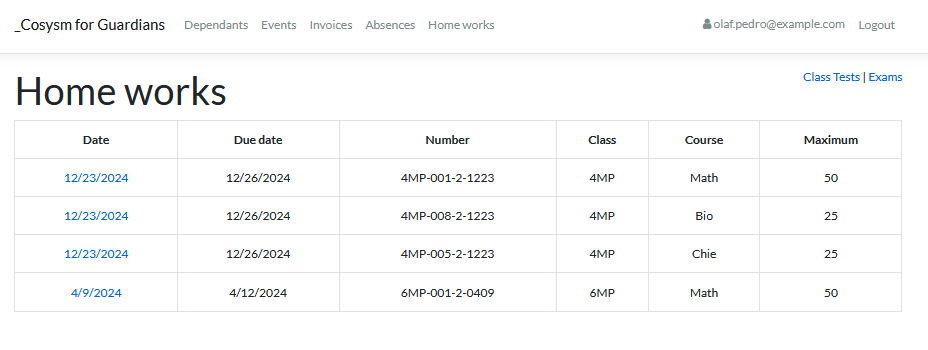
The homework section usually displays a list or calendar view of assignments:
- List View: Shows assignments with details like subject, due date, title, and status (e.g., Assigned, Submitted, Graded).
- Calendar View: Displays assignments plotted on their due dates.

Viewing Assignment Details
- Click on a specific homework entry in the list or calendar.
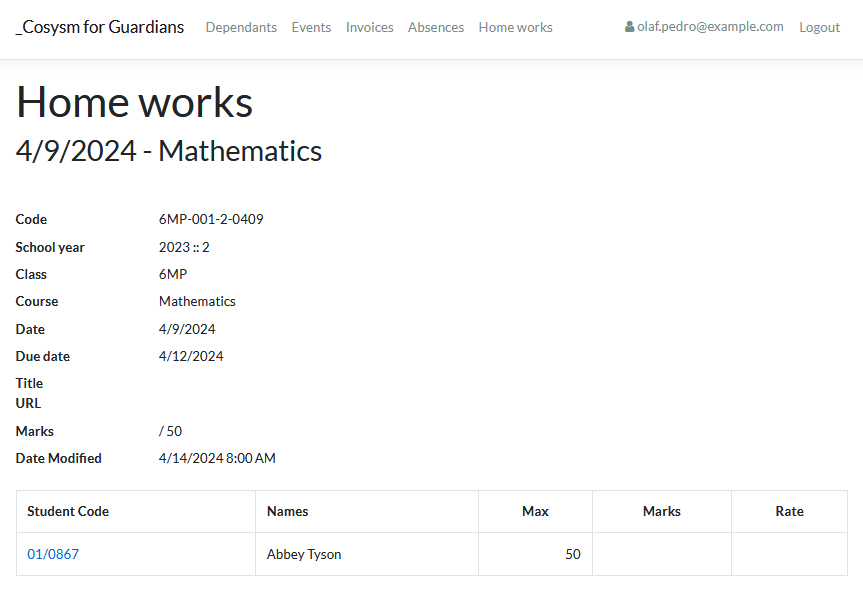
- This will open a detailed view, which may include:
- Full instructions or description.
- Attached files or resources provided by the teacher.
- Submission status (if applicable).
- Grade or feedback (once available).
Use this section to keep track of your student's assignments and deadlines.